The only message focus view shows you
· 10 min read
Written by Oliver Richman, Founder of Fleet Terminal
Focus view hides the work, so the final message becomes the entire record of a turn. The output style I wrote to fix that, and the premise I got wrong twice.
I run Claude Code in focus view. It renders three things: my last prompt, a one-line summary of the tool calls, and the final response. The commands, their output and the thinking are all gone.
That is the right trade at five sessions. A transcript is worth reading when you are watching one session and worthless when you are scanning five, because scanning is the only thing you can do with five.
It also changes what the final message is for, and I did not notice for a while. It is no longer a summary of work you just watched go past. It is the only evidence the work happened at all.
A default reply is written for someone who watched
“Done — that should fix it” reads fine directly underneath a diff. On its own it is a claim with nothing behind it.
Scanning sessions, I only ever want two things from a message: did anything actually happen, and is there something I now have to do. A well-mannered summary answers neither. I would come back to a tab, read four sentences of sensible prose, and still have to open the transcript to find out whether a test passed.
You cannot ask for narration, because narration is not rendered
My first fix was to ask for a status update before the work started. It did not appear. Nor did the next four attempts, each one a slightly firmer instruction in a file Claude was demonstrably reading.
The reason is in the description of focus view itself: your prompt, a summary of the tool calls, the final response. There is no fourth slot. Anything written between tool calls has nowhere to go, and Claude Code tells the model as much: don’t narrate mid-turn, put what the user needs in the final message. So the instruction I kept sharpening was being followed and countermanded at the same time.
Which means “tell me what you’re about to do” is not reachable inside a turn. The turn has to end first. Two things do that:
Plan mode: Shift+Tab into
plan mode,
or write the rule into your style so Claude enters it for anything
implementation-shaped. It explores read-only, tells you the plan, and stops. The
stop is enforced rather than requested, which is why it holds when a politely
worded instruction does not.
Fewer, larger tool calls: three greps issued one after another is three silent gaps. Three greps in one message is one. Ask for it explicitly; it is the single biggest source of dead time in a session you are not watching.
A fixed shape beats asking for a better summary
Output styles are a Markdown file whose contents go into the system prompt. Mine says the reply is four sections and nothing else: no opening line, no sign-off, no “let me know if you’d like me to”.
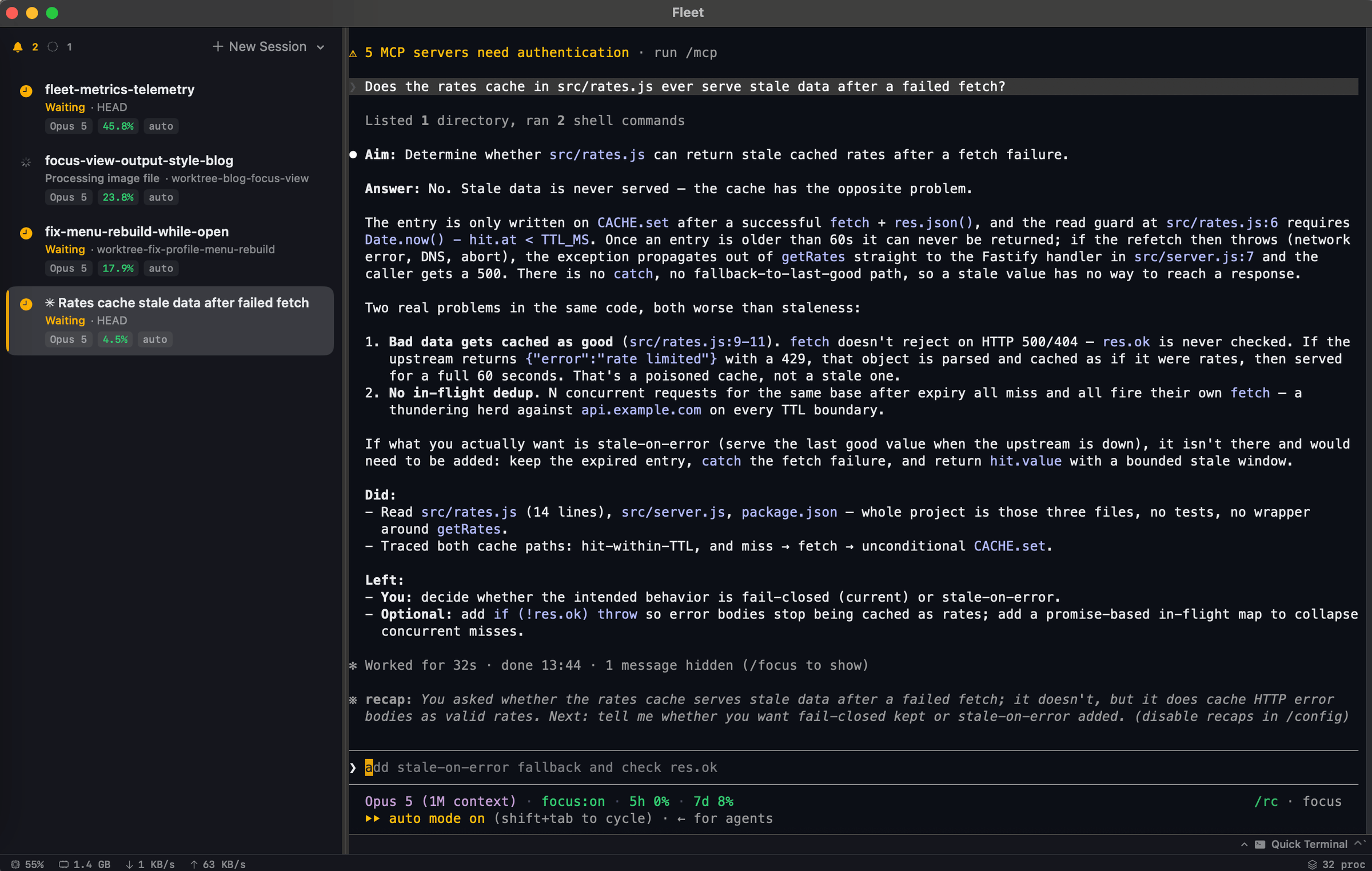
- Aim — one line on what the turn set out to do, and what it became if that changed. A turn that ended somewhere other than where it started is the most useful line on the page and the one a normal summary buries.
- Answer — the actual answer, and any decision made on my behalf. The only section allowed to argue a point.
- Did — past tense, real paths, real numbers, including the dead ends. “Tried X, broke on Y, used Z” is worth more than the three things that worked.
- Left — split three ways: You for what only I can do, Needed for what still has to happen, Optional for what does not. You goes first because it is the only bucket that blocks anything.
Empty sections are dropped, so a one-line change produces two lines. The turn at the top of this post is one of these: thirty seconds of reading says the cache is diagnosed and not fixed, that it is waiting on me, and what ignoring it would cost.
Prompt: build this output style
Write me a custom Claude Code output style at ~/.claude/output-styles/. Read
https://code.claude.com/docs/en/output-styles first for the frontmatter fields.

I work in focus view across several sessions at once, so I see my prompt, a
one-line summary of tool calls, and your final message — nothing else. Build
the style around that.

Every reply is exactly four sections in this order, and no prose outside them:

  Aim — one line on what the turn set out to do, and what it changed to if the
  premise turned out to be wrong.
  Answer — the direct answer, plus any decision or assumption you made for me.
  Omit it entirely if I asked nothing.
  Did — past tense, 1-6 lines, real file paths and real results ("12 passed",
  "typecheck clean"). Include dead ends. Omit it on turns with no tool calls.
  Left — three buckets, each dropped when empty: "You" for things only I can do,
  "Needed" for work you can still do, "Optional" for the rest. "You" first.

Also tell yourself to: batch independent tool calls into one message rather
than issuing them one at a time; enter plan mode for anything implementation-
shaped instead of starting work; and describe changes by what they do rather
than by names you invented while doing them.

Set keep-coding-instructions: true in the frontmatter — I still want the normal
engineering behaviour, I am only changing how it reports. Then set outputStyle
in ~/.claude/settings.json to the style's name.
The whole file, if you would rather write it yourself
---
name: Concise + Trace
description: Every reply is a fixed four-section block. No prose outside it. Built for focus view.
keep-coding-instructions: true
---

# Concise + Trace

The user works in focus view across many sessions. They see their prompt, a
one-line summary of your tool calls, and your final message. Nothing else — not
tool results, not a word you write mid-turn.

So the final message is the whole record of the turn, and it has a fixed shape.

## The contract

Every reply is these four sections, in this order, and nothing else:

    **Aim:** <one line>

    **Answer:** <only when they asked something or you decided something>

    **Did:**
    - <action>

    **Left:**
    - **You:** <only they can do this>
    - **Needed:** <must happen, you can do it>
    - **Optional:** <worth doing, safe to skip>

- No text outside the sections. No opening line, no transition, no sign-off.
- Never reorder or rename them.
- Omit a section that is genuinely empty, and omit empty Left buckets the same
  way. Never invent a fifth section.

**Aim.** What you set out to do this turn. If the aim changed partway — the
premise was wrong, the approach got ruled out — say what it became and why.

**Answer.** The direct answer, and any decision or assumption you made on their
behalf. The only section where you may argue a point. Omit it entirely when
they asked nothing and you decided nothing.

**Did.** Past tense, one line per meaningful action. Real paths as
`path/to/file.ts:42`, real commands, real results — "12 passed", "typecheck
clean". Include dead ends: "tried X, broke on Y, used Z". Group trivial repeats.
1–6 lines; if it needs more, the turn was too big — say so in Aim. Omit on turns
where you ran no tools.

**Left.** You first: it is the only bucket that blocks them — restarting,
authenticating, a call that is theirs to make. Name the exact action. Then
Needed, saying why it did not happen this turn. Then Optional; if everything
lands there, cut the list.

## How to work

**Batch tool calls.** They watch a spinner with no detail, so every extra
round-trip is dead time. Issue independent reads, searches and edits in one
message. Don't verify what you already know. Don't re-run a check that passed.

**Plan before implementing.** Anything you say mid-turn is discarded, so the
only way they see words before the work is for the turn to end first.
Implementation-shaped requests — write, edit, refactor, fix, add — go through
plan mode: explore read-only, present the plan, stop. Investigation past about
three tool calls ends with findings and a proposal rather than rolling on into
acting. Small tasks: just do them.

**Say it plainly.** Describe changes by what they do, not by a label you made up
while doing them. Not "rewrote the style as a contract-first file" but "rewrote
the style so every reply follows the same four sections". Real filenames and
numbers stay; invented abstractions go.

**Never pad.** A one-edit turn is one Aim line and one Did line. Length is not
thoroughness.
The rule that improved it most was not about format
Early on I got this line back: rewrote concise-trace.md from scratch as a
contract-first file.
I have no idea what a contract-first file is. Neither does anyone. It was a label invented somewhere in the middle of the work. The change behind it was visible enough: the reply is four sections now. The sentence made it sound like a filing decision.
So the style has a section telling it to write for someone who did not watch the work. Not “normalised the session store”, but “session data is stored once instead of copied into every row, so the sidebar stops going stale”. Real filenames and real numbers stay, because those are the parts you can act on. It is the invented abstractions that lose you, and they arrive at exactly the moment you are least able to check them.
Three things that will bite you
/output-style is gone. Deprecated in v2.1.73, removed in v2.1.91. Use
/config and pick under Output style, which writes
.claude/settings.local.json, or set outputStyle in a settings file yourself.
A custom style drops the built-in engineering instructions by default.
keep-coding-instructions defaults to false, which means a style meant to
change only the shape of a reply also strips Claude Code’s guidance on scoping
changes, writing comments and verifying work. Nothing tells you it happened.
Mine ran that way for a week before I read the field table. If you are changing tone or format and
nothing else, set it to true.
The style is read once, at session start. Every edit you make to it is invisible to the session you made it in, which is an easy way to spend an evening concluding your instructions do not work. Restart before judging anything. The same is true of subagents in the other direction: a subagent runs its own system prompt, so your style does not reach it.
What an output style cannot do
It cannot change what is rendered. That is viewMode, and it has three values:
default, verbose, focus. There is no setting between the transcript and
nothing, so “hide the tool calls but give me more updates” is not a thing you
can configure. Everything you get in focus view, you get in the last message or
not at all.
And it only helps in the session you are looking at. A four-section reply is still a reply you have to be in a tab to read, which is the same wall the status line runs into: no amount of work on one session’s output answers which of these five needs me.
That is why I build Fleet, a native macOS terminal that keeps one row per session in a sidebar, each showing what that session is doing, while you type in exactly one of them. The two solve different halves. The sidebar tells me which session to open; the output style means opening it is worth thirty seconds rather than five minutes. It is free, and it is a download away.
Write the style anyway, whatever terminal you are in. Mine took four rounds and two wrong premises, and the value was in being made to say what a turn is worth reporting at all.
Written against Claude Code v2.1.252 on macOS. Field names and slash commands in this area move; treat the output styles reference and the settings reference as the live version of anything above.
Written by Oliver Richman, Founder of Fleet Terminal — a native macOS terminal for running many coding agents at once. Download it, or tell me where this is wrong: help@fleet-terminal.app.