Everything Claude Code hands your status line
· 11 min read
Written by Oliver Richman, Founder of Fleet Terminal
Which of the forty-odd fields are worth putting on the line, four prompts that build them, and two things the docs do not tell you.
Claude Code’s status line is a script you own. It sits at the bottom of the session, Claude Code runs it, hands it a large JSON object, and prints back whatever it returns.
Mine showed a context percentage for months, until I noticed I had stopped reading it, which is the only real test of a status line, and went to see what else was in that object. Forty-odd fields, as it turns out, and I was using two of them.
Why context came off my line
A status line can only describe the session it is drawn in. For most of what goes on one, that is fine. Context percentage is the exception, because it is exactly the number you want for the session you are not looking at. The one that has been grinding for forty minutes while you worked somewhere else is the one worth knowing about, and its status line is on a screen you cannot see.
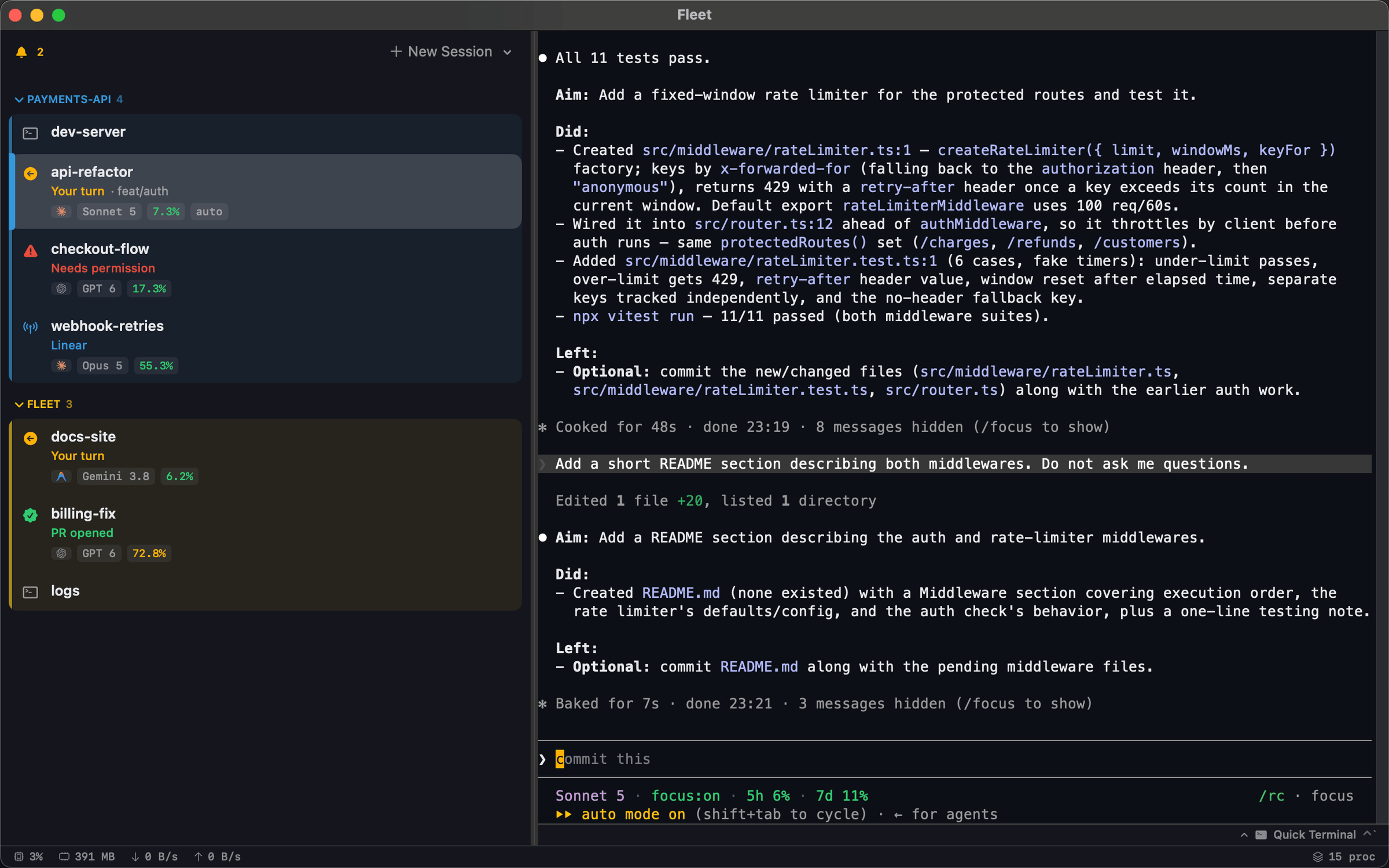
So context moved off the line entirely. I run my sessions in Fleet, a native macOS terminal I build for exactly this: one row per Claude Code session in a sidebar, each showing what that session is doing, which model it is on and how full its context is, all of it visible while I type in one of them.
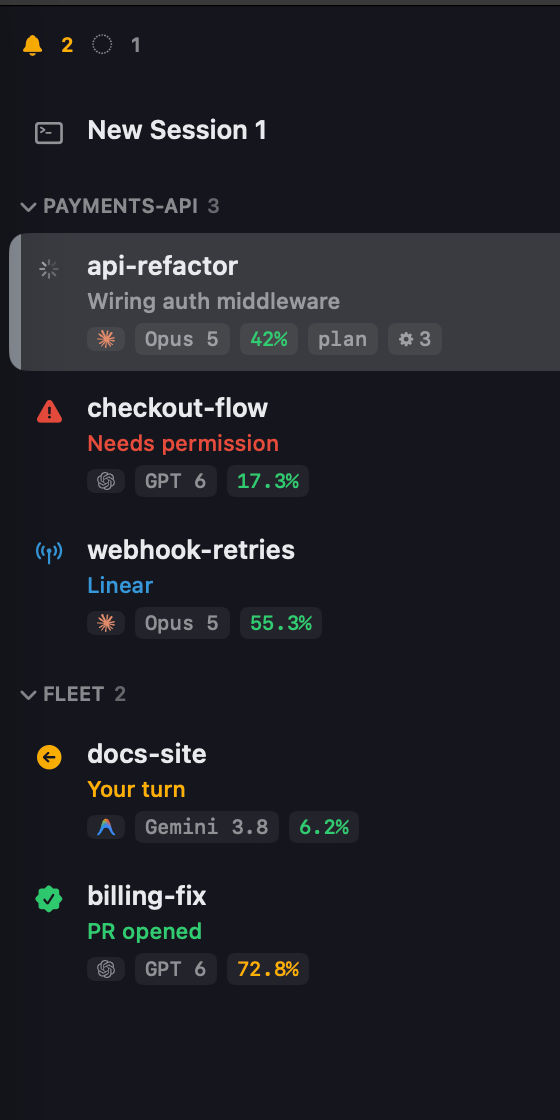
What went on the line instead is the thing that is true of the account rather than the session: a five-hour allowance and a weekly one, refilling on a clock you do not control and cannot shortcut by starting over. That belongs on the line precisely because it is the same wherever you are.
The fields worth putting on a line
The full list is in the docs and it is long, versioned and growing. Read it there rather than trusting a table in a blog post. These are the ones I think earn their space, and why:
| Field | Why it is worth the room |
|---|---|
rate_limits |
five_hour, seven_day and spend_limit, each with used_percentage and a resets_at in epoch seconds. The only numbers on the line you cannot recover from. |
prompt_cache |
warm, and recache_tokens_if_cold — what your next turn will reprocess if you walked away. Nothing else tells you this happened. |
pr |
number, url and review_state. A review result without leaving the terminal. |
worktree |
branch and original_branch — what this worktree forked from, which the branch name never says. |
effort · fast_mode · thinking |
Current modes. Cheap to render, and easy to forget you changed one. |
context_window |
used_percentage, already calculated. Worth it if you have nowhere better to put it. |
rate_limits and prompt_cache both need v2.1.251 or later, and both are
absent from the payload entirely until they have data, so handle them missing
rather than assuming a zero.
Setting one up
Point statusLine at a script in ~/.claude/settings.json:
{
  "statusLine": {
    "type": "command",
    "command": "node ~/.claude/statusline/line.js",
    "refreshInterval": 60
  }
}
Updates are event-driven, and the triggers are better than you would guess:
a message landing, a model change, and the moment a rate-limit window actually
reaches its resets_at. What they do not give you is a countdown that ticks,
and they go quiet while a session sits idle waiting on background agents. Hence
refreshInterval, in seconds, minimum 1.
The script gets the JSON on stdin and writes one line to stdout. That is the entire contract, which means the fastest way to get any of the lines below is to hand the requirement to Claude Code and let it write the file.
Four lines, four jobs
Pick one. A status line that says nine things says nothing.
The quiet one
Model and branch. Furniture rather than a dashboard, and the right choice if you mostly live in one repo.
Prompt: build the quiet line
Set up my Claude Code status line to show just the model and the current git
branch. The reference is https://code.claude.com/docs/en/statusline — check it
rather than guessing at field names.

Write it as a node script at ~/.claude/statusline/line.js. It receives the
status line JSON on stdin and should print a single line to stdout. Take the
branch from `worktree.branch` when that is present and fall back to
`git rev-parse --abbrev-ref HEAD` run in `cwd`. When there is no branch at all —
I am often outside a repo — print the model alone rather than a trailing
separator.

Then point `statusLine` in ~/.claude/settings.json at it.
The one that watches your allowance
The replacement for context percentage. The reset countdown only appears once a window is three-quarters gone, so nothing ticks at you all day.
Prompt: add the rate limits
Add my 5-hour and 7-day rate limits to my Claude Code status line. See
https://code.claude.com/docs/en/statusline#rate-limit-usage for the field shapes.

They arrive as `rate_limits.five_hour` and `rate_limits.seven_day`, each with
`used_percentage` from 0 to 100 and `resets_at` as Unix epoch seconds. Render
them as `5h 42%` and `7d 18%` — green under 70%, yellow from 70, red from 90.

Add a `⟳` countdown to the reset, but only once a window is past 75%. I do not
want a clock ticking at me all day.

`rate_limits` is missing from the payload entirely until the windows have data,
so handle it absent rather than defaulting to zero. Also set
`refreshInterval: 60` on the statusLine settings object, or the countdown will
only move when something else triggers a repaint.
The one for working in parallel
If you keep several worktrees open, the branch name stops being enough.
worktree-auth-fix does not say what it forked from, and in a few days you will
not remember. original_branch does. The PR block renders nothing when the
branch has no PR, so the line stays short in the common case.
Prompt: add worktree and PR context
Add worktree and pull request context to my Claude Code status line. Field
shapes are at https://code.claude.com/docs/en/statusline#available-data.

When `worktree` is present, show `[wt←<original_branch>]` after the branch, so I
can see what this worktree forked from. Note `worktree.branch` and
`worktree.original_branch` are both absent for hook-based worktrees.

When `pr` is present, show `PR #<number>` followed by a mark for
`pr.review_state`, which is one of approved, pending, changes_requested or
draft — green ✓ for approved, red ✗ for changes_requested, and something quiet
for the other two. `review_state` can be absent even when `pr` is present, so
handle that.

Both blocks must render nothing at all when the field is missing. Most of my
branches have no PR and the line needs to stay short.
The one that catches a cold cache
Every request re-sends the whole conversation, so the API keeps the processed prefix and reads it back instead of reprocessing it. That cache expires. Step away for longer than its TTL and your next message pays to rebuild the lot, and nothing tells you it happened.
prompt_cache.recache_tokens_if_cold is the size of the bill, sitting right
there in the payload:
Prompt: warn me when the cache goes cold
Add a cold prompt-cache warning to my Claude Code status line. The fields are
documented at https://code.claude.com/docs/en/statusline#prompt-cache-fields.

`prompt_cache.warm` is false once the cache has expired, and
`prompt_cache.recache_tokens_if_cold` is how many tokens my next turn will have
to reprocess. When both are set, show `✳ cold 184k` in yellow, rounded to
thousands.

Print nothing at all when the cache is warm, which is nearly always, and nothing
when `prompt_cache` is absent — it is missing until the first API response.
All four in one script, if you would rather write it yourself
#!/usr/bin/env node
"use strict";
const { execSync } = require("child_process");

const C = {
  magenta: "\x1b[95m", cyan: "\x1b[36m", green: "\x1b[32m",
  yellow: "\x1b[33m", red: "\x1b[31m", dim: "\x1b[90m", off: "\x1b[0m",
};
const paint = (col, s) => `${col}${s}${C.off}`;

function branch(s) {
  if (s.worktree?.branch) return s.worktree.branch;
  try {
    return execSync("git rev-parse --abbrev-ref HEAD", {
      cwd: s.cwd, encoding: "utf8", stdio: ["ignore", "pipe", "ignore"],
    }).trim();
  } catch { return ""; }
}

function limit(label, w) {
  if (!w) return null;
  const pct = Math.round(w.used_percentage);
  const col = pct >= 90 ? C.red : pct >= 70 ? C.yellow : C.green;
  let clock = "";
  if (pct >= 75 && w.resets_at) {
    const m = Math.max(0, Math.round((w.resets_at * 1000 - Date.now()) / 60000));
    clock = ` ⟳${m >= 60 ? `${Math.floor(m / 60)}h${m % 60}m` : `${m}m`}`;
  }
  return paint(col, `${label} ${pct}%${clock}`);
}

const MARK = { approved: " ✓", changes_requested: " ✗", draft: " ◦", pending: " ·" };
const PR_COL = { approved: C.green, changes_requested: C.red };

function render(s) {
  const out = [];
  if (s.model?.display_name) out.push(paint(C.magenta, s.model.display_name));

  const b = branch(s);
  if (b) out.push(paint(C.cyan, b));
  if (s.worktree?.original_branch) {
    out.push(paint(C.yellow, `[wt←${s.worktree.original_branch}]`));
  }
  if (s.pr) {
    const state = s.pr.review_state;
    out.push(paint(PR_COL[state] ?? C.dim, `PR #${s.pr.number}${MARK[state] ?? ""}`));
  }

  out.push(limit("5h", s.rate_limits?.five_hour));
  out.push(limit("7d", s.rate_limits?.seven_day));

  const pc = s.prompt_cache;
  if (pc && pc.warm === false && pc.recache_tokens_if_cold) {
    out.push(paint(C.yellow, `✳ cold ${Math.round(pc.recache_tokens_if_cold / 1000)}k`));
  }

  return out.filter(Boolean).join(paint(C.dim, " · "));
}

let raw = "";
process.stdin.on("data", (d) => (raw += d));
process.stdin.on("end", () => {
  // A status line that throws is a status line that is not there. Stay quiet.
  try { process.stdout.write(render(JSON.parse(raw))); } catch {}
});
The sibling key, for agent rows
statusLine has a sibling: subagentStatusLine,
which replaces the body of each row in the agent panel when you fan agents out.
If you run a lot of subagents it is the more useful of the two, and almost
nobody has it set.
The contract differs in one way that will cost you an afternoon. It expects
one JSON object per line on stdout, {"id": …, "content": …}, rather than
the plain text the main line returns. Omit a task’s id to leave its default row
alone; give it an empty content to hide the row entirely.
Prompt: decorate my agent rows
Set up a `subagentStatusLine` so each running agent row shows how long it has
been going, how many tokens it has used, and which model it is on. It is
documented at
https://code.claude.com/docs/en/statusline#subagent-status-lines — read that
first.

Grade the token count against each task's own `contextWindowSize` rather than a
fixed number, so a Sonnet subagent and an Opus one are coloured on their own
scales. Both `model` and `contextWindowSize` are omitted for a task whose model
is not resolved yet, so handle that.

Remember it must print one JSON object per line — {"id": ..., "content": ...} —
not plain text like the main status line, and print nothing when there are no
tasks.
The one thing the docs do not spell out is the shape of tokenSamples: it is a
flat array of numbers, not the timestamped objects the name suggests. I had
written a burn-rate calculation against the shape I assumed, and it was dead
code until I ran a throwaway agent against an instrumented script and printed
the real payload. Print it before you build on it.
Two things that bit me
Clickable links depend on terminal detection rather than on you. Wrapping a PR
block in an OSC 8 hyperlink
is supported, and mine rendered as flat text anyway, because Claude Code probes
the terminal for hyperlink support and had decided mine did not have it.
FORCE_HYPERLINK=1 claude overrides the probe. I spent an afternoon concluding
the feature was broken before finding that in the
troubleshooting section.
Not everything you want is in the payload. Focus mode, for instance, is a
global flag in ~/.claude.json rather than a field. You can read it off disk,
but do not read it as being about the session in front of you.
Where a status line stops
Context is not the only thing this is true of. Every number on the line describes the session you are already looking at, so the moment you have five running the question stops being “how is this one doing” and becomes “which of these needs me”. No amount of work on the line answers that, because you have to be in a session to read its line at all.
Which is why I built Fleet: a native macOS terminal that puts one row per session in a sidebar, each carrying its state, model and context, all of it visible while you work in exactly one of them. It reads the same numbers the line does: my status line writes a small sidecar beside the session and the sidebar picks it up, which is how the percentages in that screenshot got there. It is free, and it is a download away.
Build the line anyway. It is an afternoon, or a few of the prompts above, and deciding what deserves to be on it is most of the value. I ended up with four numbers I act on and none I ignore.
Written against Claude Code v2.1.251 on macOS. The payload grows most releases, so treat the status line reference as the live version of anything above and this as an argument about which parts of it matter.
Written by Oliver Richman, Founder of Fleet Terminal — a native macOS terminal for running many coding agents at once. Download it, or tell me where this is wrong: help@fleet-terminal.app.